


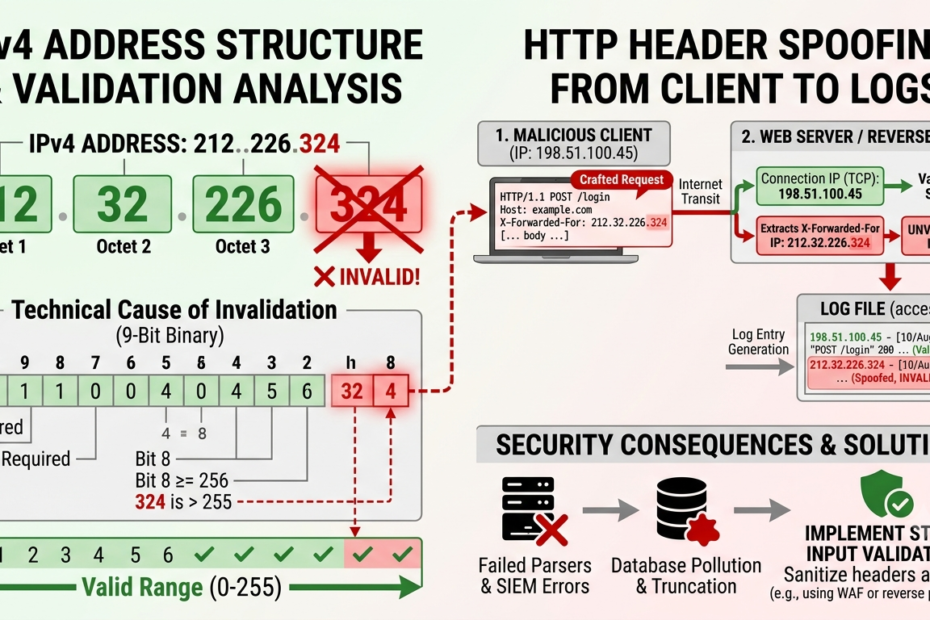
If you spotted 212.32.226.324 during a server log audit, firewall rule configuration, or security check, the immediate answer is simple: 212.32.226.324 is not a valid IPv4 address. It cannot route traffic across the public internet, nor can it belong to a real device.
Seeing an invalid string like this in your access logs, security dashboards, or configuration files generally points to one of two causes: a standard human typing error or a malformed HTTP request designed to bypass log parsers and Web Application Firewalls (WAFs).
This guide breaks down the networking mechanics behind why this string fails validation, how to determine whether it is a typo or a security risk, and how to handle non-standard IP entries in your infrastructure logs.
The Technical Breakdown: Why 212.32.226.324 Fails IPv4 Protocol Rules

To understand why 212.32.226.324 is invalid, we have to look at the Internet Protocol Version 4 (IPv4) standard established in RFC 791.
| Official Standards: Refer to RFC 791 (Internet Protocol Specification) for complete details on IPv4 addressing standards and octet structures. |
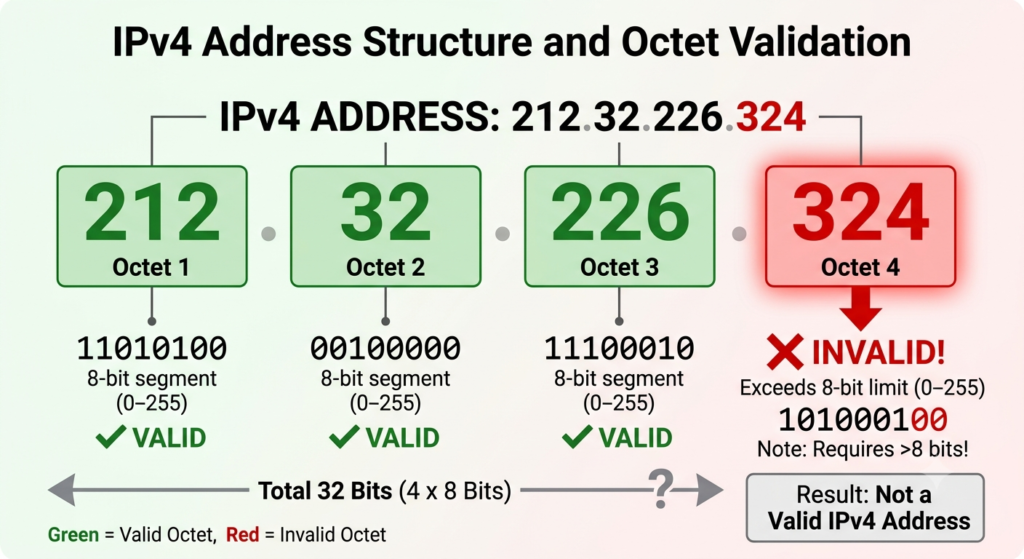
An IPv4 address is a 32-bit numeric address written as four decimal numbers separated by periods (dotted-decimal notation). Each of these four numbers is called an octet because it represents an 8-bit binary number.
Because an 8-bit segment can only represent values from 00000000 to 11111111 in binary, no single octet in a standard IPv4 address can exceed 255.
Let’s dissect 212.32.226.324 octet by octet:
-
First Octet (
212): Valid (falls between 0 and 255). -
Second Octet (
32): Valid (falls between 0 and 255). -
Third Octet (
226): Valid (falls between 0 and 255). -
Fourth Octet (
324): INVALID. 324 exceeds the maximum possible 8-bit limit of 255.
Because the fourth octet breaks the fundamental rules of the IPv4 specification, network routers, firewalls, and operating system network stacks will immediately reject this string as unroutable.
| Octet Position | Value in 212.32.226.324 | Valid Range | Status |
| 1st Octet | 212 |
0 – 255 | Valid |
| 2nd Octet | 32 |
0 – 255 | Valid |
| 3rd Octet | 226 |
0 – 255 | Valid |
| 4th Octet | 324 |
0 – 255 | INVALID (Exceeds 255) |
Analyzing the Root Cause: Typographical Error vs. Malicious Intent
When an unroutable IP address shows up in a database or web server log, system administrators need to determine how it got there. In practice, non-valid IP strings usually stem from two sources.
1. Human Typographical Errors
If 212.32.226.324 was manually entered into an allowlist, configuration file, or documentation, it is almost certainly a simple typo. During network diagnostic testing, common transposition mistakes include:
-
Transposed digits: The user meant to type
212.32.226.234or212.32.226.243. -
Extra keystrokes: An extra
3was inadvertently added to24, turning24into324. -
Subnet confusion: A user attempting to write a CIDR notation string (like
212.32.226.0/24) misformatted the trailing characters.
If you are trying to run an IP lookup on 212.32.226.324 because of a configuration prompt, re-check your original source material for a transposed digit.
2. Log Poisoning, Proxy Headers, and Obfuscation
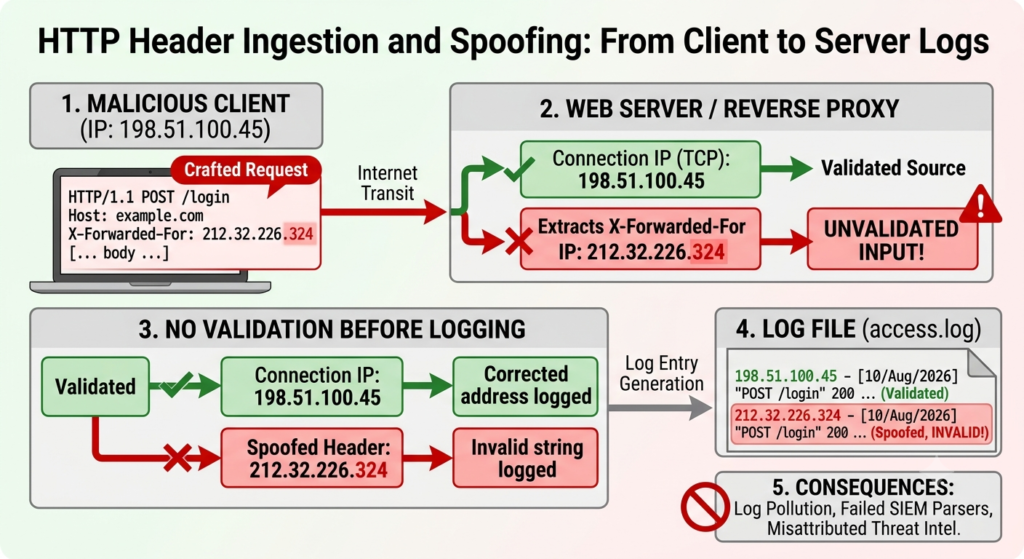
If 212.32.226.324 appears in your automated HTTP server access logs (such as Nginx, Apache, or IIS), it was likely delivered via a crafted client request.
Attackers often use automated scripts to send custom HTTP request headers (such as X-Forwarded-For, Client-IP, or True-Client-IP). Because many web applications record whatever text is inside these headers directly into log files without pre-validation, a malicious actor can insert arbitrary strings like 212.32.226.324.
Why would an attacker send an invalid IP address?
-
Fuzzing and Vulnerability Scanning: Threat actors systematically inject out-of-bounds numbers to see if your backend application crashes, triggers an unhandled exception, or exposes stack traces.
-
Bypassing Security Filters: Poorly written security scripts that attempt to parse IP addresses using weak regular expressions may fail or skip validation entirely when encountering numbers above 255, inadvertently allowing traffic through.
-
Log Pollution: Flooding access logs with garbage entries complicates forensic analysis during an active security incident.
Security & Action-Oriented: “Unsure if this IP address poses a security risk to your network? [Read More: 111.09.150.182 IP Lookup: Location & Security Guide]”
How Malformed IP Strings Impact Server Logs and Firewalls
An invalid IP address cannot participate in a standard TCP/IP handshaking process. This means a packet with a source header of 212.32.226.324 cannot complete a real network connection across the public internet.
However, once a connection is established (using a real underlying IP address), the client can transmit malformed header data that gets stored in your application layer.
[ Client (Real IP: 198.51.100.45) ]
               │
               ▼  HTTP Request with Header: "X-Forwarded-For: 212.32.226.324"
[ Web Server / Reverse Proxy ]
               │
               ▼  Fails IP Validation / Logs Raw Header
[ Unvalidated Database or Log File ]
When systems process these malformed strings without prior sanitization, several operational risks arise:
-
Parser Failures: Security Information and Event Management (SIEM) tools, automated scripts, or log analyzers (like Fail2ban) may fail or throw errors when trying to convert
212.32.226.324into an IP object, leading to unhandled exceptions. -
Database Truncation Errors: Databases expecting a fixed-length string or a strict
INETdatatype will reject the insertion of invalid network formats. -
Misattributed Threat Intelligence: Automated IP lookup scripts attempting to query WHOIS or threat intelligence databases (such as AbuseIPDB) for
212.32.226.324will return lookup failures, potentially stalling automated incident response pipelines.
Step-by-Step Technical Audit: Investigating Invalid IPs in Your Logs
If you need to investigate where 212.32.226.324 came from in your environment, follow this structured process.
Step 1: Isolate the Raw Request Log
Do not rely solely on summarized analytics dashboards. Access the raw log file (e.g., /var/log/nginx/access.log or Apache’s other_vhosts_access.log) to inspect the entire HTTP request line along with all associated headers.
Look for the actual TCP connection IP (usually the first address in the connection log) versus the forwarded headers.
Step 2: Extract the Real Underlying IP Address
If 212.32.226.324 appears in an X-Forwarded-For header chain, look at the socket remote address recorded by your edge load balancer or reverse proxy. That socket address represents the real source of the traffic.
Step 3: Validate IP Syntax Programmatically
Ensure your custom log parsers or security scripts strictly validate IPv4 syntax before storing or processing IP strings. For example, in Python, use the native ipaddress module to catch invalid octets safely:
Python
import ipaddress

def validate_ip(ip_str):
    try:
        ip_object = ipaddress.ip_address(ip_str)
        return f"Valid IP: {ip_object}"
    except ValueError:
        return f"Invalid IP format detected: {ip_str}"

# Testing the target string
print(validate_ip("212.32.226.324"))
# Output: Invalid IP format detected: 212.32.226.324
Step 4: Perform WHOIS Lookups Only on Corrected Addresses
Because 212.32.226.324 is invalid, standard WHOIS lookups will fail. If you suspect a typo and are looking for legitimate netblocks, verify the corrected range (such as 212.32.226.0/24) against official Regional Internet Registries like RIPE NCC (which manages European IP allocations under the 212.0.0.0/8 block).
IP Allocation Registries: Check the IANA IPv4 Address Space Registry to understand regional allocations for valid
|
Best Practices for Network Security and Input Validation
To protect your infrastructure from malformed IP strings and log poisoning attempts:
-
Sanitize HTTP Headers at the Edge: Configure reverse proxies (like Nginx, HAProxy, or Cloudflare) to strip or sanitize untrusted client headers before traffic reaches your internal application logic.
-
Enforce Strict Schema Rules: In database systems, store IPv4 addresses using native IP types (such as PostgreSQL’s
inetorcidrtypes) rather than plain text, forcing validation at the database layer. -
Update WAF Rules: Configure your Web Application Firewall to automatically block requests that contain non-conformant IP formats in standard header fields.
-
Graceful Exception Handling: Ensure all internal telemetry, SIEM parsers, and custom auditing scripts gracefully drop or flag invalid IP formats rather than crashing.
Frequently Asked Questions
Is 212.32.226.324 a valid IP address?
No. 212.32.226.324 is not a valid IPv4 address. The fourth octet (324) exceeds the maximum allowed value of 255 defined by the IPv4 standard (RFC 791).
Can I run a WHOIS or IP lookup on 212.32.226.324?
No. Standard WHOIS registries and IP lookup services cannot query 212.32.226.324 because it does not exist on global routing tables. If you need to perform an IP lookup, verify whether a typo occurred in the final octet (e.g., checking 212.32.226.24).
Why is an invalid IP like 212.32.226.324 appearing in my server logs?
It usually appears due to human typing errors during manual entry, or because a client submitted a spoofed HTTP request header (such as X-Forwarded-For) containing an arbitrary, unvalidated string.
Can an attacker spoof 212.32.226.324 at the TCP/IP network layer?
No. While an attacker can forge packet headers at the network layer, routers on the internet will drop packets with unroutable source addresses. Furthermore, a full TCP handshake cannot be established using an out-of-bounds octet like 324.
How should system administrators handle invalid IP entries?
System administrators should ensure web applications sanitize all incoming request headers, enforce strict input validation in log parsing scripts, and configure reverse proxies to overwrite untrusted headers with the true client socket address.
About the Author
Ruth Blair is a cybersecurity researcher and technical writer specializing in network diagnostics, WHOIS intelligence, and threat telemetry. With a background in systems analysis, Ruth translates complex IP routing data, server logs, and security infrastructure into actionable insights for webmasters and network administrators. When not analyzing network traffic, she focuses on making web security accessible to everyday internet users.